
yunohost.md 16 KB
% Installation de YunoHost
Installation initiale
Espace disque minimal
Le système de fichier doit comporter au moins 30 Go d'espace. Pour ajouter cet espace, voir la procédure ci-dessous
Ajout d'espace sur un disque via LVM
Nécessité d'augmenter l'espace disque : How to add an extra second hard drive on Linux LVM and increase the size of storage
# pvcreate /dev/sdb
  Physical volume "/dev/sdb" successfully created.
# vgextend debian-template-vg /dev/sdb
  Volume group "debian-template-vg" successfully extended
# lvextend -L +20G /dev/debian-template-vg/root
  Size of logical volume debian-template-vg/root changed from <6.81 GiB (1743 extents) to <26.81 GiB (6863 extents).
  Logical volume debian-template-vg/root successfully resized.
# man resize2fs
# man ^C
# resize2fs -p /dev/mapper/debian--template--vg-root
resize2fs 1.47.0 (5-Feb-2023)
Filesystem at /dev/mapper/debian--template--vg-root is mounted on /; on-line resizing required
old_desc_blocks = 1, new_desc_blocks = 4
The filesystem on /dev/mapper/debian--template--vg-root is now 7027712 (4k) blocks long.
Procédure
# wget -O - https://install.yunohost.org | bash
--2025-02-22 00:53:35--  https://install.yunohost.org/
Resolving install.yunohost.org (install.yunohost.org)... 80.67.164.12, 2001:910:1400:115::30
Connecting to install.yunohost.org (install.yunohost.org)|80.67.164.12|:443... connected.
HTTP request sent, awaiting response... 200 OK
Length: 25949 (25K) [application/octet-stream]
Saving to: ‘STDOUT’

-                                   100%[===================================================================>]  25.34K  --.-KB/s    in 0s

2025-02-22 00:53:35 (236 MB/s) - written to stdout [25949/25949]

    Done
  ╭───────────────────────╮
  │ YunoHost Installation │
  ╰───────────────────────╯

  • Installing YunoHost requires to install various important services,
    and possibly rework the configuration of some services that may already
    be installed (such as: nginx, postfix, dovecot, fail2ban, slapd)

    Are you sure you want to proceed (y/n) ? y

  • Additionally, it is encouraged to let YunoHost manage the SSH configuration.
    However, you should be aware that:
      • SSH login using root will be disabled (except from local network).
        Instead, you should login using the first YunoHost user.

    (Note that this will only be effective *after* you run YunoHost's postinstall)

    Should YunoHost override the SSH configuration (y/n) ? y

  🚀 Let's go !

  📜 Detailed logs will be available in /var/log/yunohost-installation_20250222_005335.log

  1/5 • Running system upgrades

    Done

  2/5 • Install dependencies needed before the main install

    Done

  3/5 • Apply various tweaks to prepare installation

    Done

  4/5 • Adding YunoHost repository to apt

    Done

  5/5 • Installing YunoHost

    Done

  🎉 YunoHost installation completed!

  ╭───────────────────────────────────────────────────────────────────────────╮
  │ You should now proceed with Yunohost post-installation.                   │
  │ This is where you will be asked for:                                      │
  │ • the main domain of your server ;                                        │
  │ • the administration password ;                                           │
  │ • the name and password of the first user, which will also be admin.      │
  │                                                                           │
  │ You can perform this step, either:                                        │
  │ • from the command line, by running 'yunohost tools postinstall' as root  │
  │ • or from your web browser, by accessing :                                │
  │    - https://10.1.0.14/ (local IP, if self-hosting at home)               │
  │    - https://188.165.235.71/ (global IP, if you're on a VPS)              │
  │                                                                           │
  │ If this is your first time with YunoHost, it is strongly recommended to   │
  │ take time to read the administator documentation and in particular the    │
  │ sections 'Finalizing your setup' and 'Getting to know YunoHost'.          │
  │                                                                           │
  │ It is available at the following URL : ➡️  https://yunohost.org/admindoc   │
  ╰───────────────────────────────────────────────────────────────────────────╯
# yunohost tools postinstall
Main domain: nu.aezi.fr
Admin username: ladmyn
Admin full name: Administrateur Laurent
New administration password: ***************************************************************************************
Confirm new administration password: ***************************************************************************************
Warning: The YunoHost project is a team of volunteers who have made common cause to create a free operating system for servers, called YunoHost. The YunoHost software is published under the AGPLv3 license (<https://www.gnu.org/licenses/agpl-3.0.txt>). In connection with this software, the project administers and makes available several technical and community services for various purposes. By using these services, you agree to be bound by the following Terms of Services: <https://yunohost.org/terms_of_services>.
I have read and understand the Terms of Services [Y/N]: Y
Info: Installing YunoHost…
Success! Self-signed certificate now installed for the domain 'nu.aezi.fr'
Success! Domain created
Success! The main domain has been changed
Info: The user 'ladmyn' will be added to the group 'all_users'
Info: The user 'ladmyn' will be added to the group 'admins'
Success! Group 'admins' updated
Success! User created
Info: root's password was changed
Success! Firewall reloaded
Info: Updating application catalog…
Info: (Will fetch 547 logos, this may take a couple minutes)
Success! The application catalog has been updated!
Success! Configuration updated for 'ssh'
Warning: ERROR File does not exist: '/etc/resolv.dnsmasq.conf'
Warning: ERROR File does not exist: '/etc/resolv.dnsmasq.conf'
Warning: ERROR File does not exist: '/etc/resolv.dnsmasq.conf'
Success! Configuration updated for 'yunohost'
Success! Configuration updated for 'ssl'
Success! Configuration updated for 'slapd'
Success! Configuration updated for 'nslcd'
Success! Configuration updated for 'apt'
Success! Configuration updated for 'nginx'
Info: The configuration file '/etc/postfix/main.cf' is now managed by YunoHost (category postfix).
Info: The configuration file '/etc/postfix/master.cf' is now managed by YunoHost (category postfix).
Info: The configuration file '/etc/default/postsrsd' is now managed by YunoHost (category postfix).
Success! Configuration updated for 'postfix'
Info: The configuration file '/etc/dovecot/dovecot.conf' is now managed by YunoHost (category dovecot).
Success! Configuration updated for 'dovecot'
Info: The configuration file '/etc/opendkim.conf' is now managed by YunoHost (category opendkim).
Success! Configuration updated for 'opendkim'
Success! Configuration updated for 'mdns'
Info: The configuration file '/etc/dnsmasq.conf' is now managed by YunoHost (category dnsmasq).
Info: The configuration file '/etc/default/dnsmasq' is now managed by YunoHost (category dnsmasq).
Success! Configuration updated for 'dnsmasq'
Success! Configuration updated for 'nsswitch'
Info: The configuration file '/etc/fail2ban/jail.conf' is now managed by YunoHost (category fail2ban).
Success! Configuration updated for 'fail2ban'
Warning: WARNING No diagnosis cache yet for category 'dnsrecords'
Success! YunoHost is now configured
Warning: The post-install completed! To finalize your setup, please consider:
    - diagnose potential issues through the 'Diagnosis' section of the webadmin (or 'yunohost diagnosis run' in command-line);
    - reading the 'Finalizing your setup' and 'Getting to know YunoHost' parts in the admin documentation: https://yunohost.org/admindoc.
# yunohost diagnosis run
Success! Everything looks OK for Base system!
Warning: Found 1 item(s) that could be improved for Internet connectivity.
Warning: No diagnosis cache yet for category 'dnsrecords'
Error: Found 1 significant issue(s) (and 1 warning(s)) related to DNS records!
Error: Found 5 significant issue(s) related to Ports exposure!
Error: Found 1 significant issue(s) related to Web!
Error: Found 2 significant issue(s) related to Email!
Success! Everything looks OK for Services status check!
Success! Everything looks OK for System resources!
Success! Everything looks OK for System configurations!
Success! Everything looks OK for Applications!
Warning: To see the issues found, you can go to the Diagnosis section of the webadmin, or run 'yunohost diagnosis show --issues --human-readable' from the command-line.
# yunohost diagnosis show --issues --human-readable
=================================
Internet connectivity (ip)
=================================

[WARNING] The server does not have working IPv6.
  - IPv6 should usually be automatically configured by the system or your provider if it's available. Otherwise, you might need to configure a few things manually as explained in the documentation here: https://yunohost.org/ipv6.


=================================
DNS records (dnsrecords)
=================================

[ERROR] Some DNS records are missing or incorrect for domain nu.aezi.fr (category mail)
  - Please check the documentation at https://yunohost.org/dns_config if you need help configuring DNS records.
  - According to the recommended DNS configuration, you should add a DNS record with the following info.
    Type: MX
    Name: nu
    Value: 10 nu.aezi.fr.
  - According to the recommended DNS configuration, you should add a DNS record with the following info.
    Type: TXT
    Name: nu
    Value: "v=spf1 a mx -all"
  - According to the recommended DNS configuration, you should add a DNS record with the following info.
    Type: TXT
    Name: mail._domainkey.nu
    Value: "v=DKIM1; h=sha256; k=rsa; p=MIGfMA0GCSqGSIb3DQEBAQUAA4GNADCBiQKBgQC2OODEYNU97aPQukUg9kaz1OfqgvlmNVjPZRx65RnD+dEHImQPD7oFjKQqrAELCGWEzYw+rDv4C8TfRLaheRywO8X4wom5m8k2Z5cbGmGQQ+vLzOin1PbpED1Pc/GW4pHTkaqpF9/eAAS5yh1tjrwuQol2nXZ0kVh0yPr95P+feQIDAQAB"
  - According to the recommended DNS configuration, you should add a DNS record with the following info.
    Type: TXT
    Name: _dmarc.nu
    Value: "v=DMARC1; p=none"

[WARNING] Some DNS records are missing or incorrect for domain nu.aezi.fr (category extra)
  - Please check the documentation at https://yunohost.org/dns_config if you need help configuring DNS records.
  - According to the recommended DNS configuration, you should add a DNS record with the following info.
    Type: A
    Name: *.nu
    Value: 188.165.235.71
  - According to the recommended DNS configuration, you should add a DNS record with the following info.
    Type: CAA
    Name: nu
    Value: 0 issue "letsencrypt.org"


=================================
Ports exposure (ports)
=================================

[ERROR] Port 22 is not reachable from the outside.
  - Exposing this port is needed for admin features (service ssh)
  - To fix this issue, you most probably need to configure port forwarding on your internet router as described in https://yunohost.org/isp_box_config

[ERROR] Port 25 is not reachable from the outside.
  - Exposing this port is needed for email features (service postfix)
  - To fix this issue, you most probably need to configure port forwarding on your internet router as described in https://yunohost.org/isp_box_config

[ERROR] Port 443 is not reachable from the outside.
  - Exposing this port is needed for web features (service nginx)
  - To fix this issue, you most probably need to configure port forwarding on your internet router as described in https://yunohost.org/isp_box_config

[ERROR] Port 587 is not reachable from the outside.
  - Exposing this port is needed for email features (service postfix)
  - To fix this issue, you most probably need to configure port forwarding on your internet router as described in https://yunohost.org/isp_box_config

[ERROR] Port 993 is not reachable from the outside.
  - Exposing this port is needed for email features (service dovecot)
  - To fix this issue, you most probably need to configure port forwarding on your internet router as described in https://yunohost.org/isp_box_config


=================================
Web (web)
=================================

[ERROR] Domain nu.aezi.fr appears unreachable through HTTP from outside the local network.
  - It looks like another machine (maybe your internet router) answered instead of your server.
    1. The most common cause for this issue is that port 80 (and 443) are not correctly forwarded to your server.
    2. On more complex setups: make sure that no firewall or reverse-proxy is interfering.


=================================
Email (mail)
=================================

[ERROR] The SMTP mail server is unreachable from the outside on IPv4. It won't be able to receive emails.
  - Could not open a connection on port 25 to your server in IPv4. It appears to be unreachable.
    1. The most common cause for this issue is that port 25 is not correctly forwarded to your server.
    2. You should also make sure that service postfix is running.
    3. On more complex setups: make sure that no firewall or reverse-proxy is interfering.

[ERROR] Reverse DNS is not correctly configured for IPv4. Some emails may fail to get delivered or be flagged as spam.
  - Current reverse DNS: ns3055702.ip-188-165-235.eu
    Expected value: nu.aezi.fr
  - You should first try to configure reverse DNS with nu.aezi.fr in your internet router interface or your hosting provider interface. (Some hosting providers may require you to send them a support ticket for this).
  - Some providers won't let you configure your reverse DNS (or their feature might be broken…). If you are experiencing issues because of this, consider the following solutions:
     - Some ISP provide the alternative of using a mail server relay though it implies that the relay will be able to spy on your email traffic.
    - A privacy-friendly alternative is to use a VPN *with a dedicated public IP* to bypass this kind of limits. See https://yunohost.org/vpn_advantage
    - Or it's possible to switch to a different provider
Configuration du reverse DNS
Caractéristiques
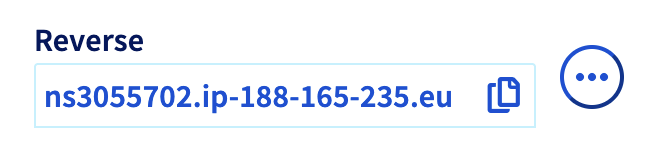
- Ancien nom OVH REVERSE: ns3055702.ip-188-165-235.eu
Procédure
Se connecter sur l'interface OVH et aller sur l'interface de gestion du serveur
Aller sur l'onglet Informations générales puis descendre jusqu'à voir apparaître la partie Réseau.
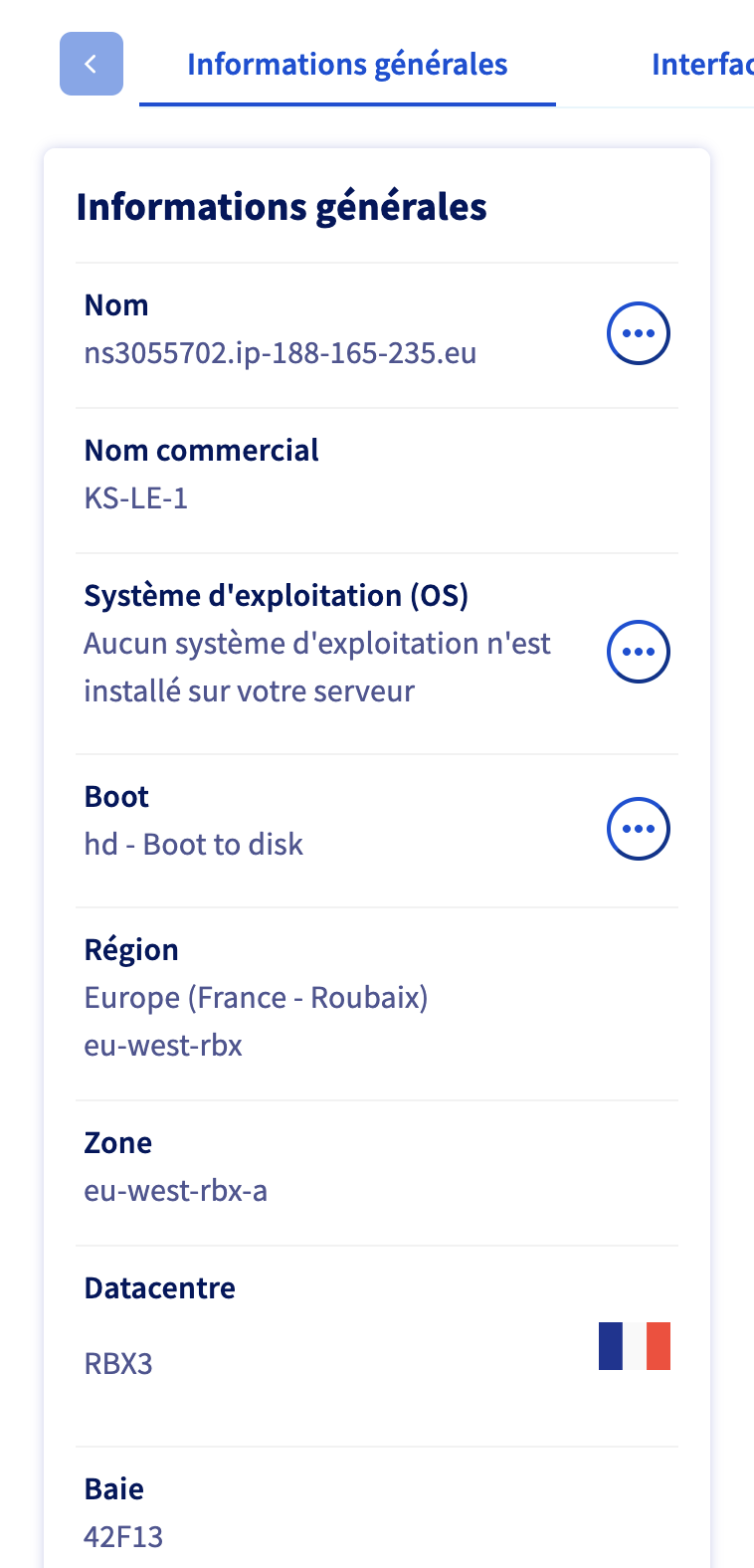
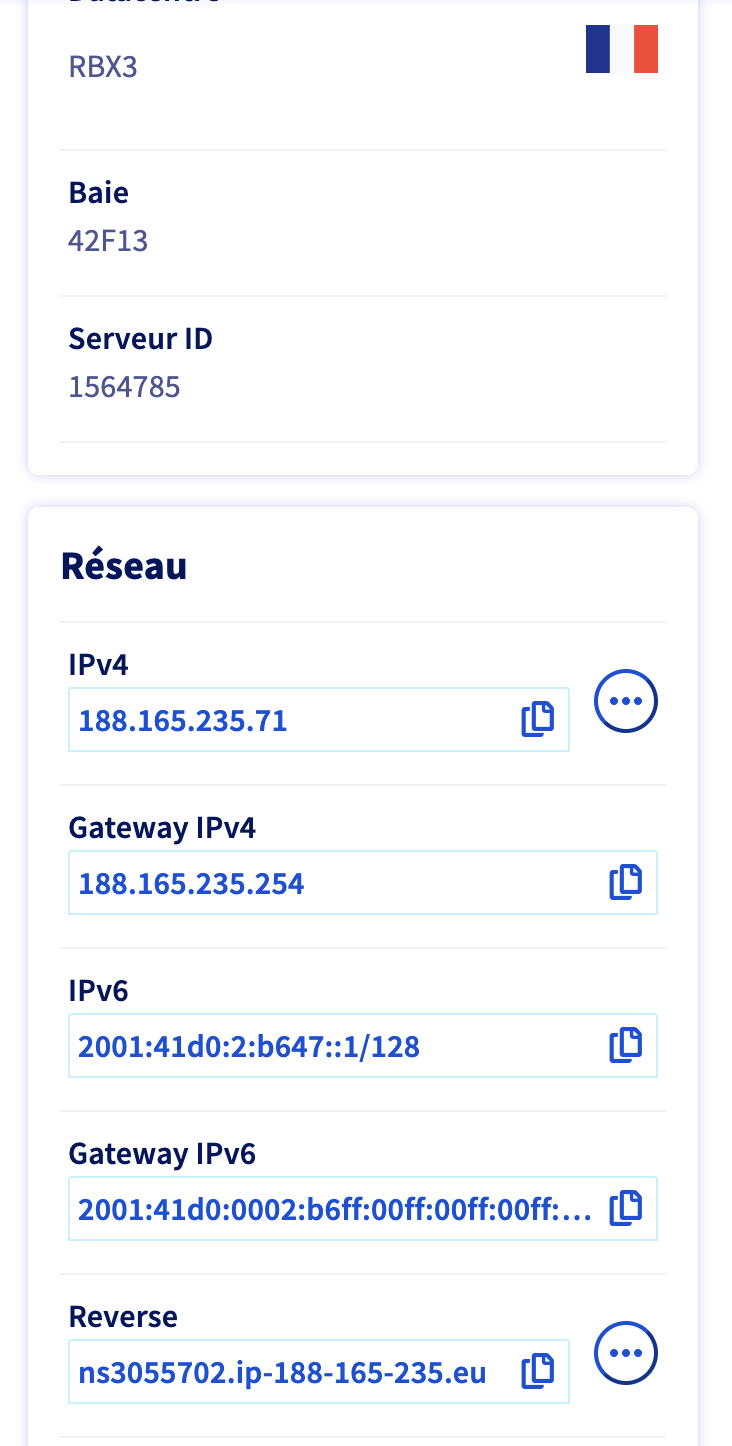
En bas de celle-ci se trouve le champ Reverse:
Premières configuration
Attention: les utilisateurs créés antérieurement à YunoHost ne permettent pas de se connecter via SSH
Donc supv ne pourra plus se connecter sauf à modifier le fichier sshd_config
Éviter les bannissements
Débannir une adresse IP | Yunohost Documentation
Gestion des certificats
On va rajouter les certificats en suivant les informations données sur la page "Reverse Proxy" et en fonction des services à installer (voir page "Services")
Authentification pour certaines app
Pour une application dans son propre sous-domaine
En cas d'erreur 401, il peut être nécessaire de désactiver certaines lignes de la configuration NGINX sur la VM YunoHost.
Voir Install web app on main domain while keeping Synapse it's server name - Tutorials - YunoHost Forum
Exemple
Par exemple: wallabag.aezi.fr
Sur la VM YunoHost, réaliser les opérations ci-dessous.
sudo nano /etc/nginx/conf.d/wallabag.aezi.fr.conf
Et commenter les lignes :
#access_by_lua_file /usr/share/ssowat/access.lua;
Redémarrer nginx
sudo systemctl restart nginx